
Excel can provide a clear, practical way to manage rental property records in Australia. A well-organised rental property accounting spreadsheet in Australia can track rent, other income, expenses, insurance payouts, repairs and renovations, while keeping each property’s activity distinct.
It’s understandable to want more than a list of transactions: you need records that make cash flow easier to follow and provide a useful overview of your investment properties. This article explains how to structure an Excel spreadsheet, what details to record and how to keep supporting documents with each entry.
Australian property examples show how to group income and expenses, why repairs and improvements need separate categories, and how a spreadsheet can help you discuss your property finances with an accountant. The goal is a reliable view of each asset, without confusing record-keeping with tax advice.
Key Takeaways
- Organise income and expense entries with supporting records so property performance is easier to review throughout the year.
- Separate records by property to make portfolio cash flow and individual property activity clearer.
- Record insurance payouts and other rental-related income alongside rent, using distinct categories for easier tracking.
- Keep repair work and property improvements separate in your spreadsheet, as they may be treated differently for tax purposes.
Tracking rental income and expenses
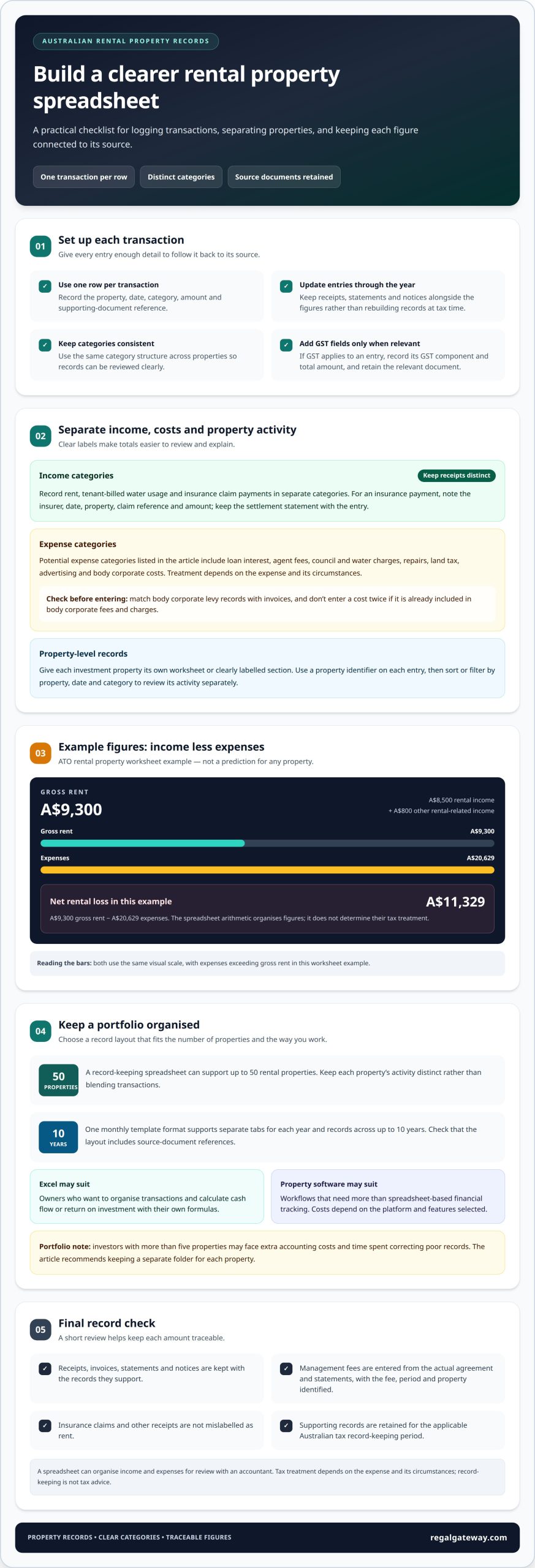
A rental property accounting spreadsheet for Australia works best when each transaction has its own row. Record the property, date, category, amount and supporting document reference. Update entries throughout the year rather than rebuilding them at tax time. Keep receipts, statements and notices alongside the figures so each amount can be traced to its source.
Eligible expenses may include loan interest, agent fees, council and water charges, repairs, land tax, advertising and body corporate costs. Tax treatment depends on the expense and its circumstances. Don’t claim a cost twice if it is already included in body corporate fees and charges. Match levy records with invoices before entering the cost.
The ATO rental property worksheet example lists A$8,500 in rental income and A$800 in other rental-related income, giving A$9,300 gross rent. It records A$20,629 in expenses and calculates a net rental loss of A$11,329. These are example figures, not a prediction for your property. Use separate categories for each actual transaction.
If GST applies to an entry, add fields for the GST component and total amount, and retain the relevant document. This keeps the record clear without assuming every rental transaction includes GST. Use the same categories in a second rental property accounting spreadsheet for Australia, while keeping each property’s entries distinct.
Free spreadsheet templates are available for tracking property income and expenses monthly. One format provides separate tabs for each year and supports records across up to 10 years. Check that the layout suits your portfolio and lets you retain source-document references.
Common record-keeping mistakes include missing receipts, mixing properties, entering expenses twice and treating every property cost alike. Keep documents with the spreadsheet and enter transactions consistently. This makes the figures easier to explain if the ATO requests supporting records.
Managing multiple Australian investment properties
Give every investment property its own worksheet or clearly labelled section. Record the property identifier, transaction date, category and supporting document for each entry. A record-keeping spreadsheet can support up to 50 rental properties, helping keep portfolio figures organised without blending one property’s activity with another’s.
Excel suits owners who want to organise transactions and calculate cash flow or return on investment with their own formulas. Property management software may suit workflows that need more than spreadsheet-based financial tracking; costs depend on the platform and features selected. Either way, link source documents to transactions and use consistent categories across properties.
Record property management costs and fee calculations from the actual agreement and statements. Enter the fee charged, the period covered and the property it relates to, then compare the entry with the relevant statement. Don’t estimate a fee using an assumed rate. Keep the supporting document and enter the expense in the appropriate category.
For example, an owner with several properties can separate mixed transactions by property, then sort each property’s records by date and category. This gives a clearer view of each asset’s income, expenses and cash flow, making differences easier to spot.
Keep receipts, invoices, statements and notices that support spreadsheet entries. These records should substantiate the income and expenses reported for each property. Retain them for the applicable Australian tax record-keeping period rather than deleting them when you update the spreadsheet.
When managing tenancies alongside portfolio records becomes demanding, property management support can help keep the operational side of an investment property in focus.
Investors with more than five properties may face extra accounting costs and time spent correcting poor records. Keep a separate folder for each property.
Rental income and insurance payouts
Give each Australian investment property its own income summary so rent and other receipts remain distinct. Record the payment date, amount, source and property identifier. Rental income may include rent, water usage charges billed to tenants and insurance claims paid during the tax year. Use a separate spreadsheet category for each type to make the annual summary clearer.
Record an insurance payment as a claim, not as rent. Enter the insurer, payment date, property, claim reference and amount, then keep the settlement statement with the spreadsheet. This clarifies the receipt when reviewing rental income or sharing figures with an accountant.
For example, a tenant may pay rent and a water usage charge, while an insurer later pays a claim. Enter each receipt on its own row and assign the same property identifier. The resulting property-level record distinguishes rent from other rental-related income.
Calculate net rental income or loss by subtracting recorded expenses from total rental income for the property. In Excel, use separate formulas to total the income and expense columns, then show the difference. If expenses exceed income, the result is a net rental loss for that spreadsheet period. This arithmetic summary organises figures but doesn’t determine their tax treatment.
For a portfolio, filter by property before reviewing totals. A monthly income summary can show when rent or an insurance payment arrived, while an annual view brings each property’s entries together. If you download an Excel template, check that it supports separate property records and categories for rent, tenant-billed water usage and insurance claims. Add a notes column for claim references or unusual receipts, and link each entry to its supporting document. This makes reconciliations more precise and helps prevent a claim payment being mistaken for rent.
Repairs, renovations and construction costs
Give each repair or improvement its own spreadsheet category, with the date, property, work description and invoice reference. A repair restores an existing feature, while renovation work that improves the property is treated differently. For example, record a repair to a damaged fitting separately from a new kitchen upgrade. Keep the invoice with each entry.
Record eligible assets and building improvements for depreciation and capital works separately, including descriptions and purchase details. Depreciation may apply to eligible assets, such as appliances, carpets and curtains, if you purchased them. Deductions for the decline in value of certain second-hand depreciating assets are available only if an exception applies. Keep capital works deductions separate from repairs in your records.
Track purchase costs in a distinct acquisition section. Stamp duty, building and pest inspections, and solicitor or conveyancing fees are capital costs added to the property’s cost base, rather than immediate deductions. Track these costs separately as part of the property’s acquisition records. Record the purchase price and each cost separately.
For borrowing, enter loan interest and fees separately from borrowing expenses. Investment property borrowing expenses are deductible over the life of the loan or 5 years, whichever is less. Keep the lender statement and loan documents linked to each entry. This distinction makes the finance history easier to review.
Forecast ongoing costs using previous invoices, current agreements and known maintenance needs. For a planned renovation, record expected work separately as a forecast, then replace it with actual invoices when paid. Record the eventual sale price and selling costs separately as well. Together with purchase details, these entries help assess potential profit and capital gains tax.
To keep tenancy operations aligned with property upkeep, discuss property management for your investment property.
Regal Gateway Property
Regal Gateway Property can help connect your investment property records with the decisions involved in owning and managing a home in Atwell, Aubin Grove, Wandi, Hammond Park, Success, Treeby or Mandogalup. If tenant arrangements, ongoing oversight or a change in ownership becomes part of your plans, its Property Management, Tenant Selection and Screening, and Residential Property Sales offerings may be relevant. A clear record can help you discuss your priorities and consider your next step. For a conversation about your property plans, contact Regal Gateway Property.
Turn clearer records into your next property decision
A rental property accounting spreadsheet in Australia can do more than organise past transactions. Its lasting value is in helping you approach the next decision with a considered view of the property’s performance, priorities and plans. Keep records current, then use them as a practical starting point when deciding how to manage or transition an investment.
As your circumstances evolve, you may consider changing how a property is managed, preparing for a sale or refining your approach to tenancy. Regal Gateway Property supports property owners with Property Management and Property Sales across Atwell, Aubin Grove, Wandi, Hammond Park, Success, Treeby and Mandogalup. The spreadsheet remains a record-keeping tool, while tax decisions call for appropriate professional advice.
When you’re ready to discuss your next property step, contact Regal Gateway Property. A clearer view of your records can help you move forward with purpose.
Frequently Asked Questions
Can you use Excel for property management?
Yes. Excel can organise rental income, expenses and tenant information, then calculate cash flow or return on investment. Give each property a consistent identifier and each transaction its own row so a rent adjustment or maintenance invoice can be traced to the right home. Keep formulas separate from manually entered figures to reduce accidental changes to totals.
Does this replace professional tax or financial advice?
No. A spreadsheet is a general record-keeping aid, not a substitute for professional tax or financial advice. Use it to assemble transaction details and supporting documents, then have the treatment of relevant amounts assessed in context. For example, recording a renovation payment documents the cost but doesn’t establish whether it qualifies as a deduction.
What should an Australian rental property accounting spreadsheet include?
Include a property identifier, transaction date, description, category, amount, payment status and supporting document reference. Add separate fields for rent, other receipts, operating expenses, finance costs and capital items. A notes field can explain unusual entries, such as a partial rent payment or an invoice covering several types of work, making later review more precise.
How to track rental income and expenses in an Australian property spreadsheet?
Enter each receipt or payment as a separate transaction rather than combining items into a monthly total. Assign the property, date and category, then match the entry to a bank statement, invoice or tenant ledger. For a partial rent payment, record the amount received and note the period it covers so the record doesn’t imply the full amount was paid.
How to calculate rental property cash flow and tax deductions in an Australian spreadsheet?
Calculate cash flow by subtracting recorded expenses from recorded income for the chosen period. Keep this figure distinct from tax deductions: a cash outflow isn’t automatically deductible, and an eligible deduction may not match the timing of a payment. Label potential deductions separately, retain supporting records and have the tax treatment assessed before using spreadsheet totals for a return.