
Two online estimates for the same Atwell home can differ because an Atwell home valuation tool uses market data and may weigh comparable sales, property features and local trends differently. A home-loan valuation can also differ from a price estimate because it assesses the property’s value, not just its market price.
It’s natural to want one clear figure when considering a sale, purchase or financial decision. An online estimate can be a useful starting point, but its reliability depends on the data available and how well it reflects the home and its location.
This guide explains what valuation tools use, why estimates vary and what to consider when comparing results. You’ll also learn when an estimate needs more context to support a confident property decision.
Key Takeaways
- Use an online estimate as a starting point, then consider whether you need a market price indication or a formal valuation for a home loan.
- Compare estimates by looking at the sales, property features and local market trends each tool takes into account.
- Prepare clear details about your home and its condition so you can understand what may shape its estimated value.
- Recognise where an online figure may miss property-specific context, and consider how residential sales guidance can help with your next decision.
How do I use the Atwell home valuation tool?
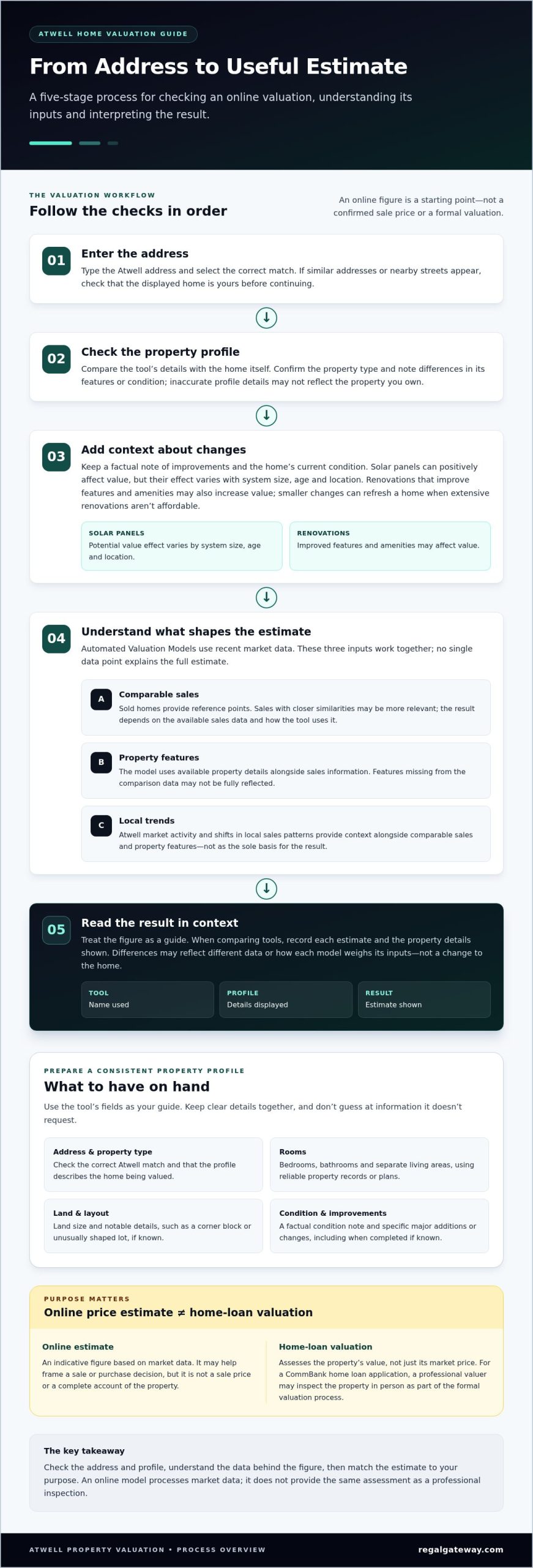
Treat an online estimate as a starting point, then check the property details behind the result. An Atwell home valuation tool can give you an indicative figure, but accurate inputs make the estimate more relevant to your home.
- Enter the address. Type your Atwell property address and select the correct match. Check that the displayed home is yours before continuing, especially if nearby streets or similar addresses appear.
- Review the property profile. Compare the information shown with what you know about the home. Note any differences in its features or condition, since inaccurate details may not reflect the property you own.
- Consider changes made to the home. Solar panels can positively affect value, according to CommBank, though their effect varies with system size and age, as well as location. Renovations that improve features and amenities may also increase value, according to CommBank. Smaller changes can refresh a home when extensive renovations aren’t affordable.
- Read the result in context. Treat the figure as a guide, not a sale price or a substitute for a formal valuation. If you’re comparing tools, record each estimate and the property details each one displays; this helps reveal where inputs may differ.
For a CommBank home loan application, a valuation assesses the property’s value, not just its market price, so it may differ from an online price estimate. CommBank says a professional valuer may inspect the property in person for a formal valuation, particularly for a home loan application. This is a different process from entering an address into an online tool.
Consider your purpose before relying on a result. An initial estimate may help you frame a sale or purchase decision, while a lender’s assessment follows its valuation process. Keep the estimate, property profile and notes on upgrades together. This helps you interpret the Atwell home valuation tool’s result in light of your home’s features and decide what to do next.
What data does the Atwell home valuation tool use?
Automated Valuation Models, or AVMs, use recent market data to estimate a property’s value. For an Atwell home, an estimate may draw on comparable sales, property features and local trends. These inputs help the model relate the home to nearby properties and market activity.
Comparable sales provide a reference point. A tool compares the property with homes that have sold, using similarities and differences to inform its estimate. A sale involving a home with different features may be less relevant than one with closer similarities. The result depends on the sales data available and how the tool uses it.
Property features help distinguish one home from another. A model considers the property details available and uses them alongside sales information. If a home has features not represented in the comparison data, the estimate may not fully reflect them. Check the property profile shown by the tool against the home itself.
Location trends provide local context. Market activity in Atwell may inform an estimate differently from activity elsewhere, and shifts in local sales patterns can affect the data used. Location is considered alongside comparable sales and property features, not as the sole basis for the result.
These inputs work together, so no single data point explains the full estimate. When comparing tools, note whether each result reflects comparable sales, property details and location trends. If estimates differ, compare their property profiles and consider whether they use similar market information. The gap may reflect different data or how each model weighs its inputs, rather than a change to the home.
Use the figure as a starting point, not a complete account of the property. An online model processes market data; it does not provide the same assessment as a professional inspection. Understanding the three inputs helps you see what an estimate captures and what it may leave out.
Banks use Automated Valuation Models and recent market data to estimate property values, considering comparable sales, property features and location trends. These inputs inform the estimated value.
What information should I prepare for an accurate Atwell home valuation?
Before using an Atwell home valuation tool, gather an accurate profile of the property. Correct details help you compare the estimate with the home you own, rather than relying on a profile that may miss its features. Keep the information together so your entries are consistent.
Start with the address and property type. Select the correct Atwell address if the tool shows similar matches, then check the property profile before continuing. A detached house and a townhouse are different property types, so make sure the profile describes the home being valued.
- Room details: Record the number of bedrooms and bathrooms, plus any separate living areas. Use the same counts shown in reliable property records or plans.
- Land and layout: Note the land size and key layout features if you have those details. A corner block or an unusually shaped lot can provide context beyond the street address.
- Property condition: Write a brief, factual description of the home’s current condition. For example, distinguish a recently updated kitchen from one that still needs work.
- Improvements: List major additions or changes and when they were completed, if known. Keep the description specific, such as an added living space, rather than using broad claims like “fully upgraded”.
- Estimate record: Save the tool name, date, displayed property details and result. This gives you a clear basis for comparing estimates later.
Use the tool’s fields as your guide, and don’t guess at details it doesn’t request. If its profile differs from your notes, record the discrepancy before interpreting the result. A missing bedroom or incorrect land detail, for example, could make the profile a poor match for your Atwell home.
Keep supporting information, such as plans or records of completed work, with your notes. You may not need to enter every detail in an online form, but a precise property summary makes it easier to spot mismatches and understand why two estimates may describe the home differently.
What are the limitations of an online Atwell home valuation
An online estimate is modelled, not based on a physical inspection of your Atwell property. It uses available property and market data, so details outside its inputs won’t directly shape the figure. For example, a tool can’t walk through a home to assess its presentation, natural light or outlook from the living area.
Standard data fields may also miss differences between properties. Two homes on the same street can have distinct layouts, privacy, upkeep and outdoor spaces. A quiet courtyard, renovated interior or room used differently from its recorded description may shape a buyer’s impression without being fully captured by a model.
Timing matters, too. An estimate reflects the market data available to the tool, while buyer interest and comparable sales change over time. A result saved before a nearby sale won’t include it unless the underlying data has been updated. Note the date of each estimate and compare results from different dates carefully.
A tool’s coverage and inputs also affect how useful its result is. If the property profile gets a feature wrong or the comparable sales are a poor match, the estimate has less relevant context. Check the address and displayed details, and note any missing characteristics. Don’t treat a single figure as a complete account of the property’s appeal.
A formal valuation has a different purpose from an online estimate. For a CommBank home loan application, it assesses the property’s value, not just its market price, and may differ from a price estimate. CommBank says a professional valuer may inspect the property in person, particularly for a home loan application. This property-specific process is different from an automated estimate.
Use an online figure to frame questions, not settle every sale decision. If you’re considering a sale, talk through your property’s market context as a practical next step.
Regal Gateway Property: Residential Property Sales
Regal Gateway Property can help you move from an online estimate towards a considered residential sale decision. If you’re weighing up a sale in Atwell, its Residential Property Sales service is a relevant next step after reviewing valuation estimates.
An automated figure is one part of the picture. Preparing a property for sale also means considering its presentation, features and appeal to prospective buyers. Bring your estimate and notes about the home’s condition or improvements into your planning, so the discussion centres on the property rather than one model-generated number.
If you’re deciding whether to sell or retain an investment, Property Management may also suit your plans. Tenant Selection and Screening supports the rental process. The right path depends on your goals for the property and the outcome you want.
Contact Regal Gateway Property to discuss your residential property plans.
Turn an estimate into a considered property decision
An estimate is most useful when it informs your decision rather than making it for you. First, decide what you need the figure to help with: preparing for a sale, assessing a potential purchase or planning your next move as an owner. That purpose gives the number context and keeps your focus on the outcome that matters.
Use the Atwell home valuation tool as one reference point while considering your property goals. Then connect that perspective with a clear plan for the home, your timing and the result you want. A deliberate approach can turn a digital estimate into a more confident direction for your property journey.
To discuss a residential sale and your next steps, contact Regal Gateway Property. With a considered plan in place, you can move towards your decision with greater clarity and confidence.